
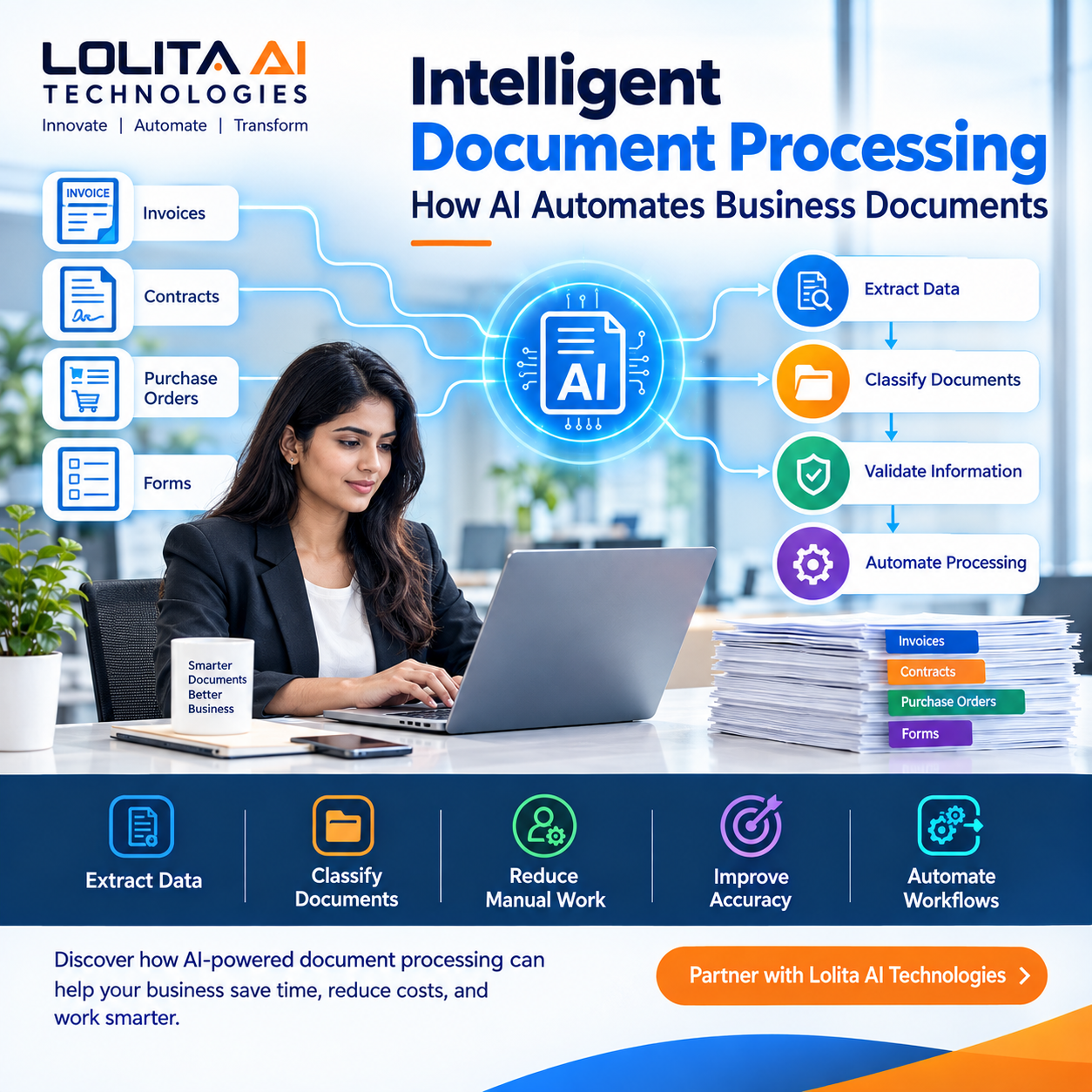
Intelligent Document Processing: How AI Automates Business Documents
INTRODUCTION
Businesses process thousands of documents every day.
Invoices, contracts, purchase orders, application forms, reports, receipts, customer documents, and internal records are essential to daily operations.
However, many organizations still depend on employees to manually read documents, enter information into systems, verify data, and move documents between departments.
This can consume significant amounts of time and increase the possibility of human error.
Intelligent Document Processing is changing the way businesses handle this work.
By combining artificial intelligence, machine learning, Optical Character Recognition, and automation, businesses can automatically extract information from documents, understand their content, classify them, validate information, and trigger the next step in a workflow.
WHAT IS INTELLIGENT DOCUMENT PROCESSING?
Intelligent Document Processing, commonly called IDP, is a technology that uses AI to process and understand business documents.
Traditional document processing may require employees to manually read documents and enter information into business systems.
IDP can automate many of these activities.
For example, when a company receives an invoice, an IDP system can identify the document, extract the invoice number, supplier name, date, tax amount, total amount, and other relevant information.
The extracted information can then be validated and transferred into the appropriate business workflow.
This creates a faster and more automated document-processing process.
HOW DOES INTELLIGENT DOCUMENT PROCESSING WORK?
Intelligent Document Processing generally involves several stages.
DOCUMENT CAPTURE
The first stage is collecting the document.
Documents can come from email attachments, scanned files, online forms, cloud storage, business applications, or other sources.
The system captures the document and prepares it for processing.
DOCUMENT RECOGNITION
AI and OCR technologies identify text and important information within the document.
This allows the system to process both digital and scanned documents.
DATA EXTRACTION
The system identifies important information from the document.
For example, an invoice may contain:
Invoice number
Supplier name
Invoice date
Purchase order number
Tax amount
Total amount
Instead of manually entering these details, AI can automatically extract them.
DOCUMENT CLASSIFICATION
The system determines what type of document it has received.
For example, it may identify a document as an invoice, contract, purchase order, application form, receipt, or customer document.
This classification allows the system to send the document into the correct workflow.
DATA VALIDATION
Extracted information can then be checked against predefined rules or other business systems.
For example, an invoice amount can be checked against a purchase order.
If the information is correct, the process can continue automatically.
If there is an issue, the document can be sent to an employee for review.
WORKFLOW AUTOMATION
After processing and validation, the information can trigger the next business process.
For example, an approved invoice can automatically move to the payment approval workflow.
This connects document processing with wider business process automation.
WHY BUSINESSES NEED INTELLIGENT DOCUMENT PROCESSING
Manual document processing creates several operational challenges.
Employees may spend hours entering information from documents into spreadsheets or business systems.
Large volumes of documents can create processing delays.
Manual data entry can also introduce errors.
Documents may need to move between several departments before a process is completed.
Intelligent Document Processing addresses these challenges by automating the repetitive parts of document management.
KEY BENEFITS OF INTELLIGENT DOCUMENT PROCESSING
REDUCES MANUAL DATA ENTRY
One of the biggest advantages of IDP is reducing repetitive data-entry work.
Employees do not have to manually enter every piece of information from invoices, forms, contracts, or other documents.
The system can extract relevant information automatically.
IMPROVES ACCURACY
Manual data entry can result in incorrect numbers, missing information, or typing mistakes.
Automated document processing can improve consistency and reduce avoidable data-entry errors.
SAVES TIME
Large volumes of documents can take employees significant amounts of time to process.
AI-powered document processing can handle many documents much faster than manual processing.
ACCELERATES BUSINESS PROCESSES
Documents often trigger important business activities.
For example, an invoice may need to be reviewed and approved before payment.
Automating document processing can help move these processes forward faster.
REDUCES OPERATIONAL COSTS
Reducing manual work can help organizations use employee time more efficiently.
Employees can focus on activities that require human judgment rather than spending large amounts of time on repetitive document processing.
IMPROVES VISIBILITY
Automated document workflows can make it easier to track where documents are in the business process.
Organizations can identify pending approvals, processing delays, and workflow bottlenecks.
SUPPORTS SCALABILITY
As businesses grow, the number of documents they process can increase significantly.
Automated document processing allows organizations to handle higher document volumes without increasing manual processing at the same rate.
COMMON USE CASES OF INTELLIGENT DOCUMENT PROCESSING
INVOICE PROCESSING
Finance teams receive invoices from multiple suppliers.
IDP can extract invoice information, validate the data, match invoices with purchase orders, and send them into approval workflows.
CONTRACT PROCESSING
Businesses manage contracts containing important information such as dates, parties, obligations, payment terms, and renewal conditions.
AI can help extract and organize important contract information.
PURCHASE ORDER PROCESSING
Purchase orders contain information required for procurement and supply chain activities.
IDP can extract purchase order information and connect it with procurement workflows.
CUSTOMER ONBOARDING
Businesses often collect forms, identity documents, applications, and supporting documents during customer onboarding.
IDP can help extract and organize information from these documents.
HUMAN RESOURCES
HR departments process resumes, employee forms, offer documents, identification documents, and other records.
AI-powered document processing can help automate data extraction and document classification.
INSURANCE
Insurance organizations process claims, forms, policy documents, receipts, and supporting evidence.
IDP can help extract relevant information and route documents through appropriate workflows.
HEALTHCARE
Healthcare organizations manage patient forms, medical documents, insurance information, and administrative records.
Document automation can help reduce repetitive administrative work while supporting structured information processing.
BANKING AND FINANCIAL SERVICES
Financial institutions process applications, statements, identity documents, forms, and transaction-related documents.
IDP can help automate document-heavy processes and reduce manual processing.
LOGISTICS AND SUPPLY CHAIN
Logistics organizations handle invoices, shipping documents, purchase orders, delivery documents, and customs-related paperwork.
AI-powered document processing can help connect these documents with operational workflows.
AI DOCUMENT PROCESSING VS OCR
OCR, or Optical Character Recognition, focuses primarily on converting text from images or scanned documents into machine-readable text.
Intelligent Document Processing goes further.
IDP can use OCR together with AI and machine learning to understand document structure, classify documents, extract relevant information, validate data, and trigger workflows.
In simple terms, OCR can help read the document.
IDP can help understand and process the document.
INTELLIGENT DOCUMENT PROCESSING AND BUSINESS PROCESS AUTOMATION
IDP becomes even more powerful when combined with Business Process Automation.
For example:
A company receives an invoice by email.
The system identifies the invoice.
AI extracts the invoice information.
The document is classified.
The information is validated against the purchase order.
The invoice is sent for approval.
The approved invoice moves to the payment process.
The transaction is recorded.
A notification is sent to the relevant team.
This creates an end-to-end automated business process.
CHALLENGES OF IMPLEMENTING IDP
Businesses should carefully evaluate their processes before implementing Intelligent Document Processing.
Document formats may vary significantly.
Poor-quality scans can affect information extraction.
Different suppliers may use different invoice formats.
Sensitive business documents also require appropriate security and access controls.
Organizations should therefore consider data quality, security, integration, workflow design, and human review requirements before implementing an IDP solution.
HUMAN-IN-THE-LOOP AUTOMATION
AI automation does not always need to remove humans from the process.
In many situations, the best approach is a combination of AI and human review.
For example, if the system is highly confident that an invoice contains the correct information, it can process it automatically.
If important information is unclear, the document can be sent to an employee for verification.
This approach combines automation with human judgment.
HOW BUSINESSES CAN START WITH INTELLIGENT DOCUMENT PROCESSING
Businesses do not need to automate every document process immediately.
A practical approach is to identify document-heavy processes that involve large volumes of repetitive work.
The business can then measure the current process.
This includes the number of documents processed, processing time, manual effort, error rates, and workflow delays.
The next step is to identify which activities can be automated.
A pilot project can then be implemented for a specific process such as invoice processing or customer onboarding.
Once the process demonstrates measurable improvements, automation can be expanded to other departments.
THE FUTURE OF INTELLIGENT DOCUMENT PROCESSING
AI is making document processing increasingly intelligent.
Future systems will be able to understand increasingly complex documents, identify relationships between information, support decision-making, and connect documents directly with business workflows.
The combination of AI, machine learning, OCR, Natural Language Processing, RPA, and workflow automation will allow organizations to build increasingly intelligent document-driven processes.
Intelligent Document Processing is therefore becoming an important component of modern digital transformation.
HOW LOLITA AI TECHNOLOGIES CAN HELP
Lolita AI Technologies provides Intelligent Document Processing as part of its broader automation capabilities.
Its automation solutions cover areas including Business Process Automation, RPA, Intelligent Document Processing, Workflow Automation, IT Systems Integration, Custom Automation Development, Automated Reporting and Analytics, and Customer Service Automation.
Businesses can use these technologies to reduce manual data entry, automate document-based workflows, improve operational efficiency, and connect document processing with wider business processes.
The right solution depends on the organization's documents, systems, workflows, business requirements, and automation objectives.
CONCLUSION
Intelligent Document Processing is changing how organizations manage business documents.
Instead of depending entirely on employees to read, classify, extract, and enter information manually, businesses can use AI-powered systems to automate much of the process.
From invoices and contracts to purchase orders, forms, customer documents, and operational records, IDP can help organizations reduce manual work, improve accuracy, accelerate workflows, and handle increasing document volumes.
The real value of Intelligent Document Processing comes when it becomes part of a larger automated business process.
AI can understand the document.
Automation can move the information.
Business systems can execute the next step.
Together, these technologies can create faster, smarter, and more scalable business operations.
FREQUENTLY ASKED QUESTIONS
What is Intelligent Document Processing?
Intelligent Document Processing is an AI-powered technology that extracts, classifies, validates, and processes information from business documents.
What is the difference between OCR and IDP?
OCR primarily converts text from images or scanned documents into machine-readable text, while IDP uses AI to understand, classify, extract, validate, and process document information.
Can IDP process invoices?
Yes. Invoice processing is one of the common applications of Intelligent Document Processing.
Can IDP work with RPA?
Yes. IDP can extract and understand information from documents while RPA can use that information to perform repetitive actions across business systems.
What types of documents can IDP process?
IDP can process invoices, contracts, purchase orders, forms, receipts, applications, reports, customer documents, and many other business documents.
Does Intelligent Document Processing eliminate human involvement?
Not necessarily. Businesses can use human-in-the-loop workflows where employees review documents when AI confidence is low or human judgment is required.
What are the benefits of IDP?
Key benefits include reduced manual work, faster processing, improved accuracy, lower operational effort, better visibility, and greater scalability.
Can small businesses use Intelligent Document Processing?
Yes. Small and medium-sized businesses can start with a specific document-heavy process and expand automation gradually.
How does IDP support digital transformation?
IDP converts document-heavy manual processes into automated digital workflows, helping businesses connect information with their wider operational systems.
Can Lolita AI Technologies develop document automation solutions?
Yes. Lolita AI Technologies provides Intelligent Document Processing and broader automation capabilities designed around business requirements.